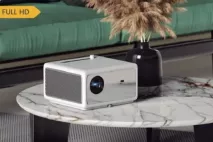
The basic data of the Liesegang dv 330 includes 1100 ANSI lumens, a resolution of XGA 1024 x 768 as well as a contrast of 200:1. The manufacturer rates the durability of the included lamp at 2000 hours. A look at the light output reveals: The 1100 ANSI lumens are sufficient to illuminate an image width of up to 289 cm in darkened rooms. If room light is present, we recommend not exceeding a maximum width of 193 cm. This device is no longer manufactured and has been removed from Liesegang's current lineup.
XGA 1024 x 768
786.432 Pixel
SXGA 1280 x 1024 compressed
Video Modes
NTSC, PAL, SECAM Pal 60 NTSC 4,43
Application
Standard-Portabel | External training and company presentations, as well as product presentations. Small screen width, rooms with very little ambient light below 50 lumens.
There are a whole range of connections on the side.
The easiest way is to connect the projector to the PC. This is also where the resolution is best. Simply connect a VGA cable to the projector and the PC. These are the nasty connections on the far right of the projector. It says RGB here. Once this is done, simply press and hold Input until RGB appears. The PC should be running so that an image can appear. If a white test image appears, press INPUT again and RGB2 will appear at the bottom right. If no picture appears here either, there are various possibilities:
1. The monitor cable is not correctly connected to the PC. So first check that everything is still wired correctly.
2 There are several VGA outputs on the PC and a monitor is connected to the projector. Then simply right-click on the desktop on Properties -> Display. Two monitors should now normally be displayed here. Now simply click on the light gray monitor and click on Expand monitor... If the background image of the monitor now appears on the projector, everything is connected correctly. Now you can either simply drag windows out to the edge of the screen to get them onto the projector. Or you can activate the Use as primary monitor checkbox and press Accept. Now simply restart the projector and it will work as a PC monitor
3. Warranty? ;-)
If none of this works... connect a DVD player to the S-Video input and keep pressing Input until a signal comes in or S-Video 1 or 2 appears at the bottom right, depending on where you plugged it in.
Other topic: Reviews:
I love this projector. You can produce a wonderful picture in wonderful brightness on short and very distant screens.
One drawback: The volume...
I would never give it away again...:-P :)
Autor:
Waldemar 05.02.08
1
Star
Setting up and connecting
How do I connect the Liesegang dv 300 correctly????????????
Have absolutely no idea.









 Liesegang Website
 Product Sheet english HC